Performance
How long kwenza takes compared with Maven and Gradle, on the same source with the same JDK, plus
exactly what was run so you can check it or repeat it. The figures and charts below are generated
by benchmarks/Bench.java
rather than typed in, and the table at the top says when and where they were measured.
Read the Gradle numbers with the daemon in mind: see Daemon and no-daemon.
Measured on |
Apple M2 Pro, 12 cores, Mac OS X 26.7.1 |
Date |
2026-10-12 |
kwenza |
commit |
JDK |
Azul Systems, Inc. 25.0.3+9-LTS, the |
Maven |
3.9.16 (wrapper) |
Gradle |
9.6.0 (wrapper) |
Warm runs |
7 timed runs per tool and operation, after one untimed run |
What was measured
Four tools and four scenarios. Every tool builds the same source: each tool’s src is a
symlink to one copy, and only the manifest (kwenza.toml, pom.xml, build.gradle.kts)
differs.
| Scenario | Project | Operations |
|---|---|---|
|
|
|
|
|
|
|
Apache Commons Lang 3.19.0: 259 source files, about
100,000 lines, no dependencies. Mostly measures |
|
What each operation does
package-
Compile the main sources and build the jar. Tests are not compiled or run, for any tool. Maven’s
packageand Gradle’sbuildrun the tests by default, so the harness uses Maven’spackagewith-Dmaven.test.skip=trueand Gradle’sassemble, which doesn’t depend ontest. Otherwise "package" would include running tests for those two and not for kwenza. test-
Resolve dependencies, compile the main sources, compile the test sources and run the tests, then report. For
junit-word-countthat is the JUnit 5 and Mockito tests. Each tool does this in its own way: kwenza starts a separate JVM running the JUnit console launcher, Maven runs Surefire, and Gradle runs a test worker. Onlyjunit-word-counthas tests in the benchmark; `commons-lang3’s tests are not run.
Both operations are a clean build: the output directory (target or build) is deleted before
every timed run, so every run compiles from source. Maven’s and Gradle’s own incremental or build
caches are not used.
How each build is run
Every tool uses its own isolated cache directory, never your real ~/.m2 or ~/.gradle: kwenza
through KWENZA_REPO, Maven through -Dmaven.repo.local and Gradle through GRADLE_USER_HOME. The
timing is the wall-clock time of the whole process, from launch to exit, so it includes JVM
start-up for every tool that isn’t running as a daemon.
Each tool is started through its launcher script: bin/kwenza, ./mvnw and ./gradlew. kwenza’s is
a few lines of shell that find the jar and run java -jar on it, which adds about 25 ms to a
build.
Daemon and no-daemon
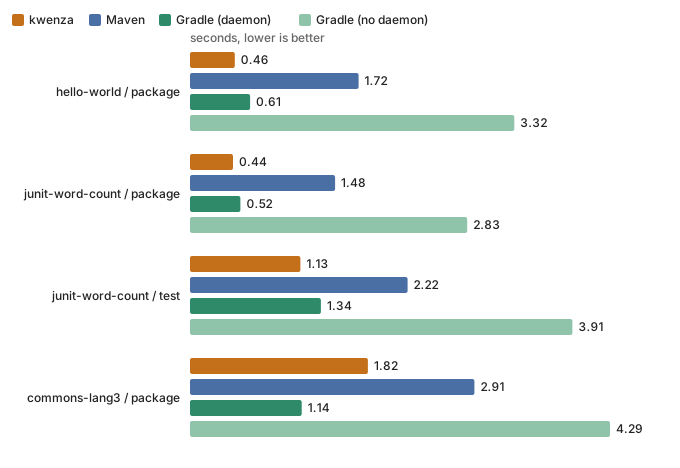
kwenza starts a fresh JVM for every command and keeps nothing running between them. Maven does the same. Gradle’s default is the opposite: the first build starts a background daemon, and every later build reuses it, with its classes already loaded and its compiler already optimised by the JIT. That is a real advantage on a repeated build, and it is why Gradle’s warm figures are much lower than its no-daemon ones.
So the charts show Gradle twice:
- Gradle (daemon)
-
./gradlewas most people run it. The timed builds reuse a daemon that earlier builds in the same run already started and warmed. This is the figure to compare against if you build over and over in one session. - Gradle (no daemon)
-
./gradlew --no-daemon. Every build pays for a fresh JVM, as kwenza and Maven do. This is the like-for-like comparison of the build logic itself, and the one that matches a CI job, where a build normally starts on a machine with no daemon.
Neither is the "right" one. They answer different questions, and a fair reading uses both.
kwenza may gain an optional daemon later, for the same reason: a warm process is the only way to remove JVM start-up and class loading from every build, and that cost matters most on small projects and in a tight edit-and-rebuild loop. It isn’t built, so none of the figures here include one. If it arrives, it will be opt-in and these pages will show it as its own line. See Design Principles for why kwenza doesn’t have one today.
Warm builds
A warm build is one where the dependency caches are already populated, so no run touches the
network. The harness does one untimed run first, then times the stated number of clean rebuilds
and reports the median and the fastest. kwenza builds from its kwenza.lock; Maven and Gradle use
their local caches. Gradle’s daemon, when it is used, is started by the untimed run and stopped
after the last timed one. This is what a build costs once a project is set up, and the figure to
look at for day-to-day work.
Operation |
Tool |
Median (s) |
Fastest (s) |
hello-world / package |
kwenza |
0.46 |
0.44 |
Maven |
1.72 |
1.68 |
|
Gradle (daemon) |
0.61 |
0.61 |
|
Gradle (no daemon) |
3.32 |
3.28 |
|
junit-word-count / package |
kwenza |
0.44 |
0.43 |
Maven |
1.48 |
1.46 |
|
Gradle (daemon) |
0.52 |
0.48 |
|
Gradle (no daemon) |
2.83 |
2.80 |
|
junit-word-count / test |
kwenza |
1.13 |
1.11 |
Maven |
2.22 |
2.19 |
|
Gradle (daemon) |
1.34 |
1.29 |
|
Gradle (no daemon) |
3.91 |
3.84 |
|
commons-lang3 / package |
kwenza |
1.82 |
1.77 |
Maven |
2.91 |
2.86 |
|
Gradle (daemon) |
1.14 |
1.04 |
|
Gradle (no daemon) |
4.29 |
4.21 |
Reading the warm results
-
Where the time goes changes with project size. A small project is mostly start-up cost, which a fresh JVM per build pays in full and a warm daemon doesn’t. A large one is mostly
javac, where a daemon’s already-optimised compiler is the advantage. So the order of the tools can differ between scenarios: look at each row rather than expecting one tool to win everywhere. -
The two Gradle bars are the same build. The gap between them is what the daemon saves, and the no-daemon bar is the one to compare with kwenza and Maven, which start a fresh JVM too (see Daemon and no-daemon).
-
These are one machine on one day. Differences of a few percent are noise; the tables give the fastest run next to the median, so you can see how noisy a row was.
Cold builds
A cold build is the first build on a machine with nothing cached, such as a new CI runner. The
tool’s dependency cache is deleted first (and kwenza.lock for kwenza), so the run has to
download everything it needs from Maven Central, and each tool does one timed run. Each tool’s
cache is separate, so one tool’s downloads never help another.
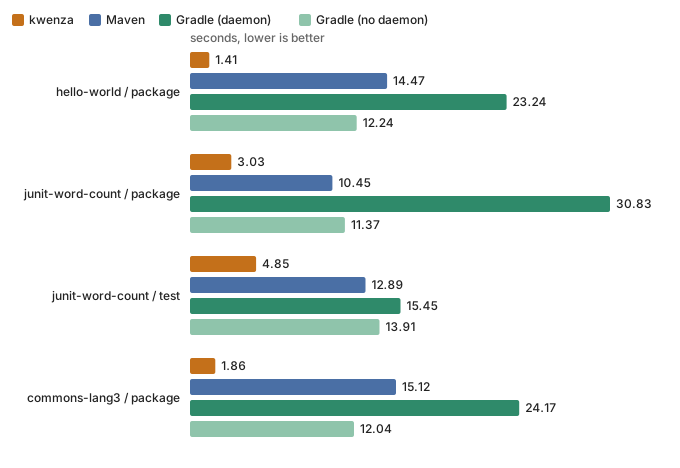
What a tool needs differs, and that is most of what this section measures. kwenza downloads only what the project declares, because compiling and packaging happen in its own process with no plugins. Maven also downloads the plugins that do each step (compiler, jar, resources, Surefire) and their dependencies. Gradle rebuilds its own caches: the build tool’s libraries and the compiled build script. The Maven and Gradle wrapper distributions (the build tools themselves, about 120 MB) are left in place, since downloading them isn’t part of building your project.
Operation |
Tool |
Time (s) |
hello-world / package |
kwenza |
1.41 |
Maven |
14.47 |
|
Gradle (daemon) |
23.24 |
|
Gradle (no daemon) |
12.24 |
|
junit-word-count / package |
kwenza |
3.03 |
Maven |
10.45 |
|
Gradle (daemon) |
30.83 |
|
Gradle (no daemon) |
11.37 |
|
junit-word-count / test |
kwenza |
4.85 |
Maven |
12.89 |
|
Gradle (daemon) |
15.45 |
|
Gradle (no daemon) |
13.91 |
|
commons-lang3 / package |
kwenza |
1.86 |
Maven |
15.12 |
|
Gradle (daemon) |
24.17 |
|
Gradle (no daemon) |
12.04 |
Reading the cold results
-
kwenza’s cold time is close to its warm time when the project has few dependencies. For
commons-lang3, which has none, kwenza has nothing to download at all, so a cold build is just a build. Maven and Gradle still download or rebuild their tooling. This is a real difference, not a trick of the benchmark: kwenza has no plugin layer to fetch. But it is a difference in what each tool needs on a fresh machine, not in how fast any of them compiles or resolves dependencies; the warm results measure that. -
hello-worldandjunit-word-counthave dependencies (Guava, and JUnit and Mockito for the tests) that every tool must download, so they are closer to a like-for-like comparison. Maven and Gradle still download their tooling on top. -
These are single runs, and a download is as noisy as the network. Gradle’s cold times vary the most, because a first build also starts the daemon and compiles the build script: the daemon variant has differed by about a factor of two between identical runs. Treat the cold figures as a rough guide to the order of magnitude, not a precise ranking.
Exact commands
Run from each tool’s project directory, with the environment variables shown. <cache> is that scenario’s isolated cache directory. kwenza is the launcher script, bin/kwenza in a checkout (installed, it’s the same script on PATH); like ./mvnw and ./gradlew, it starts the JVM for you.
Operation |
Tool |
Command |
hello-world / package |
kwenza |
|
Maven |
|
|
Gradle (daemon) |
|
|
Gradle (no daemon) |
|
|
junit-word-count / package |
kwenza |
|
Maven |
|
|
Gradle (daemon) |
|
|
Gradle (no daemon) |
|
|
junit-word-count / test |
kwenza |
|
Maven |
|
|
Gradle (daemon) |
|
|
Gradle (no daemon) |
|
|
commons-lang3 / package |
kwenza |
|
Maven |
|
|
Gradle (daemon) |
|
|
Gradle (no daemon) |
|
Limits of these results
-
Not measured: Maven’s own daemon, mvnd; builds that reuse earlier output (incremental builds); and test suites other than `junit-word-count’s.
-
kwenza’s own start-up isn’t tuned yet. Class Data Sharing and a daemon are both ideas that haven’t been adopted, so these figures are a starting point, not a ceiling.
Repeat it
You need a JDK, and the first run downloads the Maven and Gradle wrappers. From a checkout of kwenza:
bin/kwenza package                              # the kwenza jar the harness times
cd benchmarks
java Bench.java                                 # every scenario, cold and warm
java Bench.java commons-lang3 warm 10           # one scenario, warm only, 10 runs
java Bench.java all both 7 --write-docs         # also regenerate this page's tables and charts
The harness, the three project definitions for each scenario and a README on how it works are in
benchmarks/. If you get different
results on your machine, or think a tool is being run unfairly, please open an issue.